To sign a PDF online for free, open it in a browser-based signing tool, draw, type or upload your signature, place it on the signature line, add the date if the document asks for it, and download the signed copy. In England and Wales an electronic signature like this is usually enough for everyday business paperwork, such as quotes, order forms and supplier terms, provided you intend it as your signature. It is not enough on its own for documents with special formalities, such as deeds that need a witness, wills and lasting powers of attorney.
Three ways to create your signature
Most free signing tools, including Desirly's, give you three options. None is more "legal" than the others; pick the one that looks right and is easiest for you.
| Method | How it works | Best for |
|---|---|---|
| Draw | Sign with a mouse, trackpad or your finger on a phone | A signature that looks like your handwritten one |
| Type | Type your name and it is set in a handwriting style | Speed, and a tidy result on any device |
| Upload | Sign white paper, photograph or scan it, then upload the image | Reusing your real signature |
If you upload a photo, sign with a dark pen on plain white paper, crop tightly and use good light, so the signature does not arrive with a grey background.
How to sign a PDF online for free
- Check you have the final version. Read every page before you sign, not just the page with the signature line. Signing a draft creates confusion later.
- Open the free Sign PDF tool and choose your file. It runs in your browser, so the document is not uploaded to a server.
- Create your signature by drawing, typing or uploading it.
- Click on the page to place it, then move and resize it so it sits on the line. Add your initials to other pages if the document asks for them, plus the date and any text such as your printed name or job title.
- Download the signed PDF and open it to check everything is where it should be.
- Save a copy in your records before you send it.
If the PDF has fillable boxes to complete first, such as an account application, fill those in before you sign. Our guide to creating and filling PDF forms explains how.
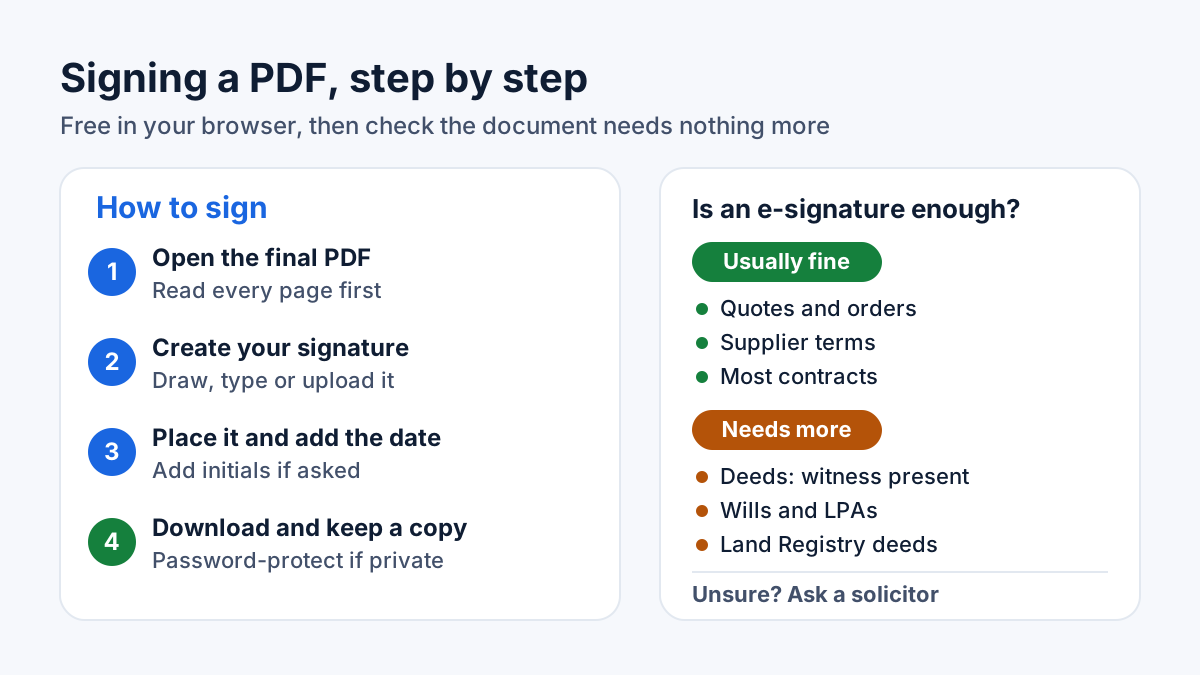
Signing takes a couple of minutes; checking whether the document needs more takes one more.
Other free ways to sign
- On a Mac, Preview has a Sign button in the Markup toolbar. Apple's instructions let you create a signature on the trackpad, by holding a signature on white paper up to the camera, or on a nearby iPhone or iPad.
- On an iPhone or iPad, the Markup tools in Apple's apps include an Add Signature option, and you sign with your finger.
- Many PDF readers include a fill-and-sign feature. Check what a free plan includes before you rely on it for regular work, and whether it uploads your files.
Electronic signature or digital signature?
These terms are often mixed up, and the difference matters when you choose a tool.
- A visual electronic signature is an image or typed name placed in the document. This is what Desirly's Sign PDF tool creates: your signature becomes part of the page. It does not add a certificate and it does not send the document to other people for signing.
- A certificate-based digital signature uses cryptography to link the signature to the signer and to show whether the file has changed since it was signed. UK law describes an "advanced" electronic signature as one that is uniquely linked to and capable of identifying the signer, and linked to the signed data so that any later change is detectable. A "qualified" electronic signature goes further, using a qualified certificate, and has the same legal effect as a handwritten signature.
For most small-business paperwork, the visual kind is what the other side expects. If a bank, a large customer or a solicitor asks for a particular signing platform or a certificate-based signature, use what they ask for.
When an e-signature is enough
In 2019 the Law Commission, which reviews the law of England and Wales, set out the position clearly: an electronic signature is capable in law of being used to execute a document, provided the person signing intends to authenticate it and any formalities for that type of document are met. The government later confirmed it agreed with those conclusions. UK eIDAS also says an electronic signature cannot be denied legal effect, or refused as evidence, simply because it is electronic.
In practice, an e-signature is usually fine for:
- quotes, estimates and purchase orders;
- supplier and trade account terms;
- most commercial contracts, NDAs and letters of agreement;
- delivery notes, timesheets and internal sign-offs.
When you need more than a quick e-signature
- Deeds. An individual signing a deed must do so in the presence of a witness who attests the signature. The Law Commission's view is that the witness must be physically present, even when both people sign electronically.
- Wills. GOV.UK says you must sign your will in the presence of two witnesses aged over 18, who then sign it in your presence.
- Lasting powers of attorney. GOV.UK says everyone must sign the same original document and cannot use digital signatures.
- Property deeds for HM Land Registry, such as transfers and mortgages. HM Land Registry accepts electronic signatures on most of these only through set processes, such as a signing platform controlled by a conveyancer.
- Anything where the other party specifies a method. Their requirement is part of what you have agreed to.
Our plain-English guide to whether electronic signatures are legal in the UK covers these exceptions in more detail. This is general information rather than legal advice: for high-value or unusual documents, ask a solicitor before you sign.
Good habits when you sign PDFs
- Show the capacity you sign in. If you sign for your company, add your name and role, for example "Director".
- Keep the evidence. Save the email that sent the document, the version you signed and the email you replied with. If anyone later questions who signed and when, that trail helps.
- Protect your signature image. A visual signature can be copied from a PDF like any picture. Do not leave signed blank pages or signature images in shared folders.
- Send private documents securely. Contracts often contain prices, bank details and personal data. You can password-protect the signed PDF with AES-256 encryption and share the password by phone or text, not in the same email.
A worked example
Here is a hypothetical example. A new wholesale supplier emails you a trade account application and their terms as one PDF. They ask you to complete the form, sign the last page and initial each page of the terms.
- You fill in the account details, then read the terms in full, noting the payment terms and minimum order value.
- In Sign PDF you type your signature, place it on the last page, add your initials to each page of the terms, and add the date and "Director" under your name.
- You download the signed file, check every page, and save it in your supplier folder.
- Because it includes your bank details, you password-protect it, email it, and text the password to your contact.
The whole job takes about ten minutes, with no printer or scanner involved.
When you next need to sign a contract or form, the free Sign PDF tool is the quickest place to start.
Frequently asked questions
Is a typed name a valid signature?
It can be. The Law Commission gives a name typed at the bottom of an email as an example of an electronic signature. What matters is that you intended it as your signature and that the document has no extra formalities, such as a witness.
Can I sign a PDF on my phone?
Yes. Browser-based tools work on phones, and drawing with your finger is often easier than using a mouse. iPhones and iPads also have a built-in Add Signature option in Markup.
Is my signature stored by the tool?
Desirly's Sign PDF tool creates your signature in your browser and saves it only inside the PDF you download. Other services work differently, so check their privacy policy.
Can a signed PDF be changed afterwards?
A PDF with a visual signature can be edited by someone with the right software, and nothing in the file will flag it. Keep your own copy of what you signed. If you need tamper-evidence, use a certificate-based signing service.
Sources
- Law Commission: Electronic execution of documents
- UK eIDAS Article 25: legal effects of electronic signatures (legislation.gov.uk)
- UK eIDAS Article 26: requirements for advanced electronic signatures (legislation.gov.uk)
- Law of Property (Miscellaneous Provisions) Act 1989, section 1 (legislation.gov.uk)
- Apple Support: Fill out and sign PDF forms in Preview on Mac
This guide is general information, not legal, tax or financial advice. Fees, rules and thresholds change, so check the official source before you act. Spotted something out of date? Tell us and we will review it.